

How do I update object properties that don’t take strings?

Use the optional DataType property in your update message with the hex setting to specify your data as hexadecimal. For example:

ChangeToValue="F0-F1-F2-F3" DataType="hex"

Your hex data can contain no spaces (“F0F1F2F3“), or be separated with spaces or hyphens (“F0 F1 F2 F3” or “F0-F1-F2-F3“).

If you have a lot of data to upload – such as a .jpg photo – you can load it from a file using DataType="filename" with the path to the file in the ChangeToValue. Refer to the ActiveADAPTER Send Adapter User Guide for more information.

And don’t forget that the ActiveADAPTER evaluation installation package includes sample messages that show you how to set logon hours and add photos for user objects using hex data.
FAQs
Which properties of Active Directory objects can ActiveADAPTER modify?

Virtually all properties. ActiveADAPTER can update, add to, or clear all properties that are compatible with string, number and byte array data types. A number of special properties are also integrated - objectGUID and objectSid, for example. This covers virtually all the properties you can see using Active Directory Users and Computers.

If there are specific properties you wish to use that you are having trouble with, let us know!

See the entire answer

What is ActiveADAPTER?

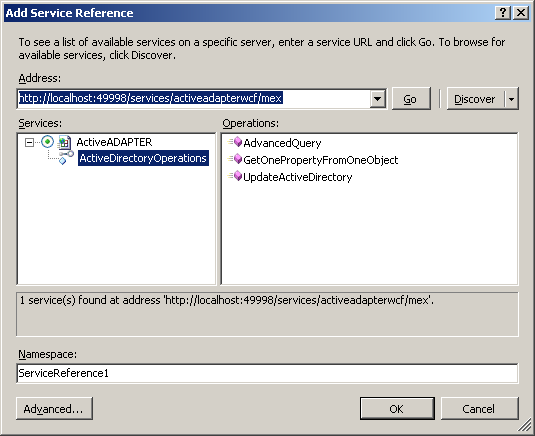
ActiveADAPTER is a set of BizTalk adapters for working with Active Directory from BizTalk Server. We offer you:

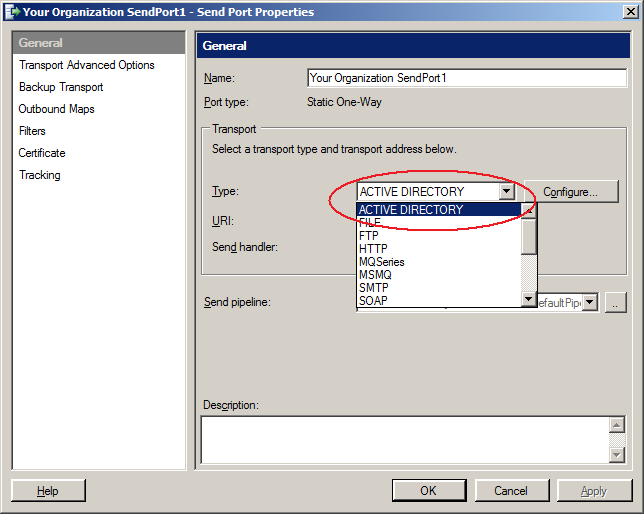
  • A BizTalk Send Adapter that you can use to:
    • Create, move and delete Active Directory objects
    • Change object properties such as email addresses, office locations, home folder locations...
    • Set user passwords and add objects to security groups
  • A BizTalk Receive Adapter that you can use to query Active Directory and receive the results in an XML message into BizTalk Server
  • The input and output schemas for all ActiveADAPTER operations
  • Sample orchestrations and example XML input
  • Complete documentation

See the entire answer

My Solicit-Response Send Port Query Is Only Returning 1000 Results

Try adding the setting PageSize="1000" to your query parameters. For example:

<ActiveDirectoryQuery><Directives WhereToBind="LDAP://CN=Users, DC=test, DC=com" Filter="(objectCategory=user)" SearchScope="onelevel" PropertiesToReturn="cn" PageSize="1000"/></ActiveDirectoryQuery>

By default Active Directory only allows for a single page of 1000 results. By explicitly setting this value multiple pages (and hence all results) are returned.

See the entire answer